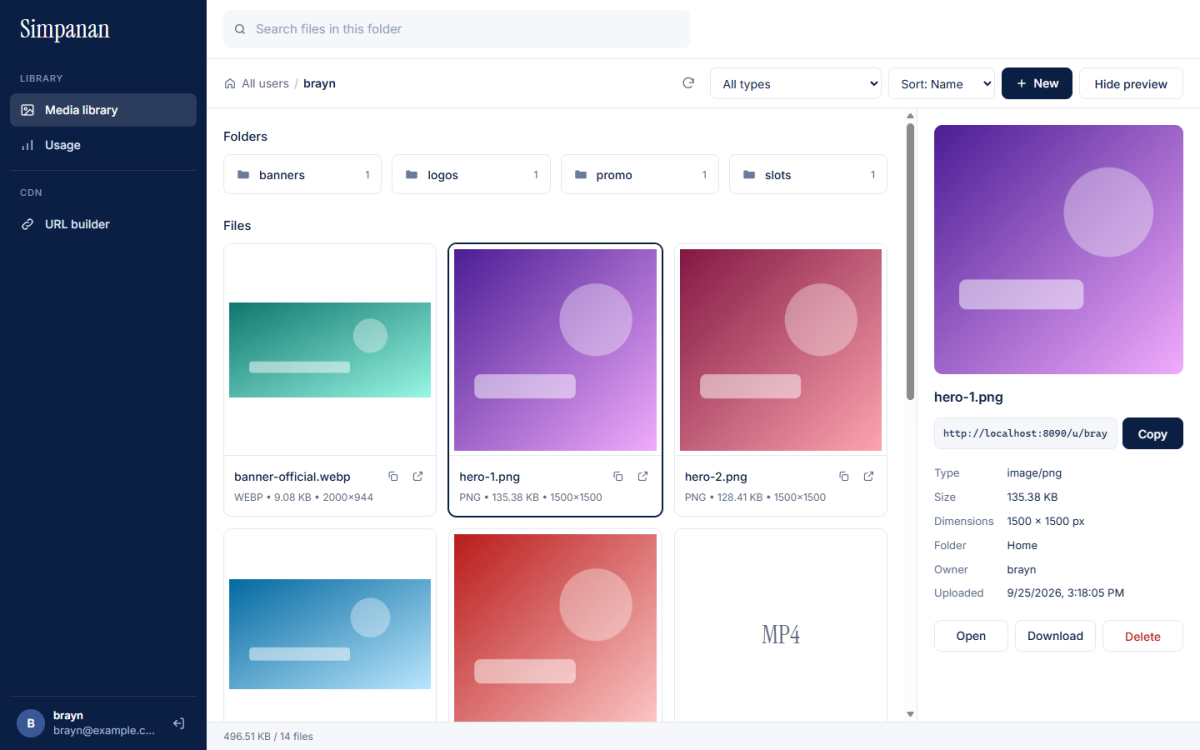
Upload any way you like
- Drag and drop files or folders anywhere on the library page.
- Folder upload including subfolders. The folder structure is recreated in the library.
- Four files at a time upload in parallel, with a single progress line at the bottom of the screen.
- System files like
.DS_StoreandThumbs.dbare skipped automatically. - Uploading a file with the same name replaces the old version, and the link stays the same.
Find files quickly
- Folders and a breadcrumb path for moving between folders, plus a New folder button.
- Search the open folder and all of its subfolders.
- Filter by type: images, videos, audio, documents and archives, text and code, or fonts.
- Sort by name, newest, oldest or largest.
Preview and details
Click a file to open the preview panel. Images are shown large, and video and audio play right there. The same panel shows the file's link with a Copy button, its type, size, image dimensions, folder and upload date, plus Open, Download and Delete buttons.
A permanent link for every file
Every file lives in your account's space, with a link like:
https://cdn.simpananawan.com/u/your-name/products/shoe.jpgUse it straight away on your website, online store or emails. For images, add options like /tr:w-600,f-auto whenever you need them, as explained in resize images with a URL.